Mirasim Documentation
Models, accounts and quota
Set the model and reasoning level per session, use your own keys or local models, manage several accounts, and choose per session between your own accounts and Mirasim credit.
Model and reasoning level are per session
The composer has three pickers: agent, model and reasoning level. They apply to the current session only, so two panes can run different models side by side.
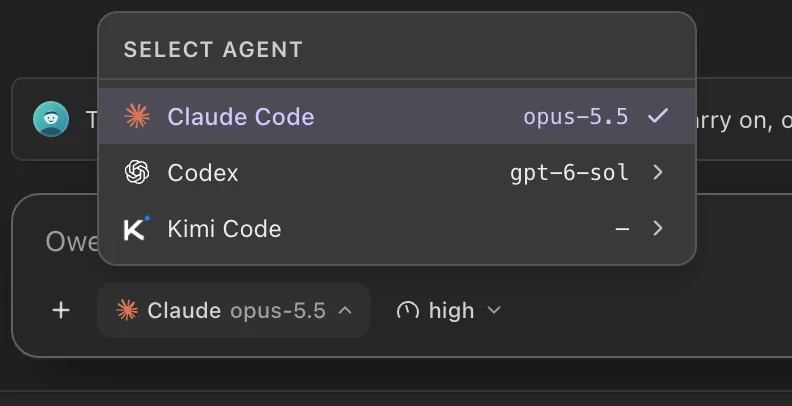
The model list has up to three parts: the agent's own models first, then Built-in (models Mirasim provides, on platform credit), then Your models (the profiles you configured). Reasoning level is offered only for models that support it.
Which agent to run
- Claude Code
- Anthropic's coding CLI, with its own sign-in and terminal UI.
- Codex
- OpenAI's terminal coding agent, with its own sign-in and terminal UI.
- Kimi Code
- Moonshot AI's coding agent, running the Kimi K models.
- DSH (DeepSeek Harness)
- DeepSeek's agent harness, running DeepSeek V4 models; signs in with a DeepSeek API key.
- Pi
- A minimal terminal agent that runs the models you add in Model Config.
- Antigravity
- Google's agent CLI, running the Gemini models.
- Qwen Code
- Alibaba's open-source coding agent for the Qwen3-Coder models.
- ZCode
- The ZCode CLI agent, running GLM models or a model provider you configure.
- Grok Build
- xAI's coding agent, running the Grok models on your account.
- OpenCode
- An open-source coding agent that uses the providers you set up in OpenCode, plus free models that need no sign-in.
If an agent is not installed yet, Agent Config installs it for you. Settings also shows each agent CLI's installed version next to the latest one.
Bring your own keys
Model Config has three layers: providers (an endpoint plus a credential), profiles (one model on a provider, with its reasoning level and token limit), and bindings (which profile an agent uses). Anthropic, OpenAI, Google and any OpenAI-compatible endpoint, including OpenRouter, are supported.
# 1 · a provider: endpoint + credential
mirasim ui-cli --port 4970 provider save \
  --kind openai-compatible --name MyRouter \
  --base-url https://example.com/v1 --api-key sk-…

# 2 · a profile: one model on that provider
mirasim ui-cli --port 4970 profile save --provider PROVIDER_ID --model some-model

# 3 · a binding: route an agent through it, or back to its own subscription
mirasim ui-cli --port 4970 model bind --agent codex --profile PROFILE_ID
mirasim ui-cli --port 4970 model bind --agent codex --native

# test a provider with one real call
mirasim ui-cli --port 4970 model test --provider PROVIDER_ID --model some-model
The 1M-token window
Some Anthropic models offer a one-million-token context window. To use it, choose the model's long-context variant, marked [1m]; it is never the default. Models without a 1M window do not show the variant.
Local models
Mirasim can run sessions on local inference: Ollama, plus mlx-lm on macOS. Other OpenAI-compatible local servers can be added as custom providers. Mirasim can detect what is installed, start a backend, and pull Ollama models with progress or delete them.
mirasim ui-cli --port 4970 local probe                       # what's installed
mirasim ui-cli --port 4970 local start --backend ollama      # bring it up
mirasim ui-cli --port 4970 local pull --model qwen3          # Ollama pull, progress on stderr
mirasim ui-cli --port 4970 local pulls                       # in-flight pulls
Several accounts, and live quota
You can store more than one account per agent and switch which one is active. The active account applies to the whole agent, not to each session.
Each stored account shows its live quota: the plan, remaining credits, how much of each current window is used, and when it resets. The state reads healthy, low or exhausted, and you can refresh it by hand.
To see every agent's quota and your platform credit at once, open the account card at the bottom left › Usage. Click a row to see its details and switch accounts.
mirasim ui-cli --port 4970 accounts --fresh                  # accounts + quota each
mirasim ui-cli --port 4970 usage                              # per-agent quota snapshots
mirasim ui-cli --port 4970 account use --agent claude --id work-account
Own account or platform credit
Each session runs on one of two routes: Own (your own accounts, API keys or local models) or Platform (Mirasim credit). The routes do not fall back to each other. When one runs out, switch the session to the other route.
- Set the default route
In Settings › Traffic monitor › Model routing, or under the account card at the bottom left › Usage › Platform, choose Own or Platform.
- Override one session
In the composer's model menu, set Quota source to Own, Platform or Follow global. It applies to that session only, from your next message.
mirasim ui-cli --port 4970 login                                  # sign in to Mirasim
mirasim ui-cli --port 4970 relay                                  # sign-in, credit and current route
mirasim ui-cli --port 4970 config set relay.mode=local            # default route: local = Own, cloud = Platform
mirasim ui-cli --port 4970 session route --session KEY --to own # one session: own | platform | defaultSomething wrong or missing on this page? Tell us